Intel i7 965 Extreme Maxishine

Showing posts with label Networking. Show all posts

Saturday, September 15, 2007


What is a Wireless Network?

There are two ways of connecting nodes on the network. Some networks are connected with cabling, others are wireless. Wireless networks use high frequency radio signals, infrared light beams, or laser to communicate between the workstations, the file server or the hubs. Each workstation and file server on the wirelss network has a transceiver or antenna to sent and receive the data. Information gets relayed between transceivers as if they were physically connected with cables.
For longer distance, wireless communications can also take place through cellular telephone technology, microwave transmission, or by satellite.

Use of Wireless Networks

Wireless networks are benificial in allowing laptop computers or remote computers to connect to the network. In older buildings, where it may be difficult or impossible to install cables wireless networks are implimanted as the solution of connectivity problems.

Types of Infrared Communictions :
  1. Line-of-Sight

Line-of-sight communication means that there must be an unblocked direct line between the workstation and the transceiver.If there is any movement within the line-of-sight (a person walking by) while there is a transmission, the information would need to be sent again in order to be received. This kind of obstruction can slow down the wireless network.
2. Scattered Broadcast

Scattered infrared communication is a broadcast of infrared transmissions sent out in multiple directions.This broadcast bounces off walls and ceilings until it eventually hits the receiver.

Wireless Network Disadvantages :
  • Provide poor security
  • Susceptible to interference from lights and electronic devices
  • Wireless networks are slower than physically cabled networks


Some technicians have a tendency to use the terms routers, hubs and switches interchangeably. One minute they're talking about a switch. Two minutes later they're discussing router settings. Throughout all of this, though, they're still looking at only the one box. Ever wonder what the difference is among these boxes? The functions of the three devices are all quite different from one another, even if at times they are all integrated into a single device. Which one do you use when? Let's take a look...
Hub, Switches, and Routers

Hub

A common connection point for devices in a network. Hubs are commonly used to connect segments of a LAN. A hub contains multiple ports. When a packet arrives at one port, it is copied to the other ports so that all segments of the LAN can see all packets.

Switch


A device that filters and forwards packets between LAN segments. Switches operate at the data link layer (layer 2) and sometimes the network layer (layer 3) of the OSI Reference Model and therefore support any packet protocol. LANs that use switches to join segments are called switched LANs or, in the case of Ethernet networks, switched Ethernet LANs


Router


http://img.alibaba.com/sitemap/archives/images/qu50054881bo_Router_8_Port.jpg
A device that forwards data packets along networks. A router is connected to at least two networks, commonly two LANs or WANs or a LAN and its ISP.s network. Routers are located at gateways, the places where two or more networks connect. Routers use headers and forwarding tables to determine the best path for forwarding the packets, and they use protocols such as ICMP to communicate with each other and configure the best route between any two hosts.

Friday, September 14, 2007


What is a Topology?
The physical topology of a network refers to the configuration of cables, computers, and other peripherals. Physical topology should not be confused with logical topology which is the method used to pass information between workstations. Logical topology was discussed in the Protocol chapter .

Main Types of Physical Topologies
The following sections discuss the physical topologies used in networks and other related topics.

Linear Bus
Star
Star-Wired Ring
Tree
Considerations When Choosing a Topology
Summary Chart
Linear Bus
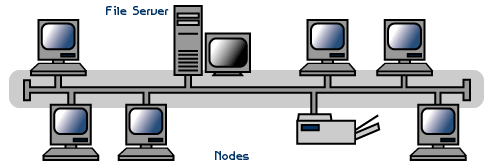
A linear bus topology consists of a main run of cable with a terminator at each end (See fig. 1). All nodes (file server, workstations, and peripherals) are connected to the linear cable. Ethernet and LocalTalk networks use a linear bus topology.

Advantages of a Linear Bus Topology
Easy to connect a computer or peripheral to a linear bus.
Requires less cable length than a star topology.
Disadvantages of a Linear Bus Topology
Entire network shuts down if there is a break in the main cable.
Terminators are required at both ends of the backbone cable.
Difficult to identify the problem if the entire network shuts down.
Not meant to be used as a stand-alone solution in a large building.
Star
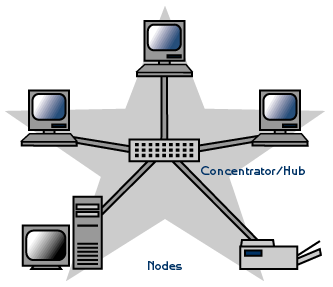
A star topology is designed with each node (file server, workstations, and peripherals) connected directly to a central network hub or concentrator (See fig. 2).

Data on a star network passes through the hub or concentrator before continuing to its destination. The hub or concentrator manages and controls all functions of the network. It also acts as a repeater for the data flow. This configuration is common with twisted pair cable; however, it can also be used with coaxial cable or fiber optic cable.

Advantages of a Star Topology
Easy to install and wire.
No disruptions to the network then connecting or removing devices.
Easy to detect faults and to remove parts.
Disadvantages of a Star Topology
Requires more cable length than a linear topology.
If the hub or concentrator fails, nodes attached are disabled.
More expensive than linear bus topologies because of the cost of the concentrators.
The protocols used with star configurations are usually Ethernet or LocalTalk. Token Ring uses a similar topology, called the star-wired ring.


Star-Wired Ring
A star-wired ring topology may appear (externally) to be the same as a star topology. Internally, the MAU (multistation access unit) of a star-wired ring contains wiring that allows information to pass from one device to another in a circle or ring (See fig. 3). The Token Ring protocol uses a star-wired ring topology.

Tree
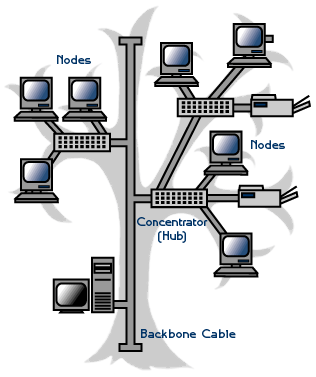
A tree topology combines characteristics of linear bus and star topologies. It consists of groups of star-configured workstations connected to a linear bus backbone cable (See fig. 4). Tree topologies allow for the expansion of an existing network, and enable schools to configure a network to meet their needs.


Advantages of a Tree Topology
Point-to-point wiring for individual segments.
Supported by several hardware and software venders.
Disadvantages of a Tree Topology
Overall length of each segment is limited by the type of cabling used.
If the backbone line breaks, the entire segment goes down.
More difficult to configure and wire than other topologies.
5-4-3 Rule
A consideration in setting up a tree topology using Ethernet protocol is the 5-4-3 rule. One aspect of the Ethernet protocol requires that a signal sent out on the network cable reach every part of the network within a specified length of time. Each concentrator or repeater that a signal goes through adds a small amount of time. This leads to the rule that between any two nodes on the network there can only be a maximum of 5 segments, connected through 4 repeaters/concentrators. In addition, only 3 of the segments may be populated (trunk) segments if they are made of coaxial cable. A populated segment is one which has one or more nodes attached to it . In Figure 4, the 5-4-3 rule is adhered to. The furthest two nodes on the network have 4 segments and 3 repeaters/concentrators between them.

This rule does not apply to other network protocols or Ethernet networks where all fiber optic cabling or a combination of a fiber backbone with UTP cabling is used. If there is a combination of fiber optic backbone and UTP cabling, the rule is simply translated to 7-6-5 rule.

Considerations When Choosing a Topology:
Money. A linear bus network may be the least expensive way to install a network; you do not have to purchase concentrators.
Length of cable needed. The linear bus network uses shorter lengths of cable.
Future growth. With a star topology, expanding a network is easily done by adding another concentrator.
Cable type. The most common cable in schools is unshielded twisted pair, which is most often used with star topologies.